

适用场景
需要自定义协议的单点登录的三方网站
不符合标准OIDC等协议的网站,但想要单点登录功能
对接自定义单点登录服务器
环境:v2.3.0 及以上专业版/企业版
同步账号
设置登录认证为账号登录,注册outer1账号作为测试。
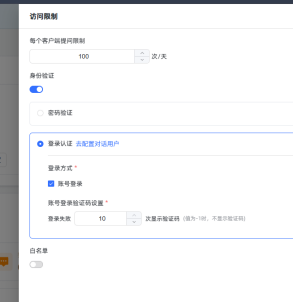
实际应用中,请调用接口把三方平台的账号都同步到MaxKB v2,只需保证账号映射成功,密码等不一定必须与三方平台一致。
获取APIEKY
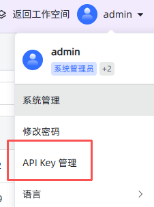
Python3创建用户参考代码(手机号、邮箱是可选项):batch_add_chatuser.py、
新增用户列表.xlsx

新建完毕后,赋予账号对应应用的权限,以正确访问应用。
参考代码:
#!/usr/bin/env python3
# -*- coding: utf-8 -*-
"""
批量新增聊天用户
"""

import json
import os
from typing import Any, Dict, List, Tuple

import requests
import urllib3
from openpyxl import load_workbook, Workbook


# 忽略证书校验告警(等价 --insecure)
urllib3.disable_warnings(urllib3.exceptions.InsecureRequestWarning)


API_URL = 'http://192.168.1.102:8080/admin/api/system/chat_user'
INPUT_XLSX = '新增用户列表.xlsx'
OUTPUT_FAIL_XLSX = '入库失败列表.xlsx'


def ensure_iterable_group_ids(value: Any) -> List[str]:
    """将 user_group_ids 转换为字符串列表。

    支持以下输入:
    - 已是 list[str]
    - 逗号分隔字符串:"default,group2"
    - 单值字符串:"default"
    - JSON 字符串:"[\"default\"]"
    过滤空白项并去重,保持顺序。
    """
    if value is None:
        return []
    if isinstance(value, list):
        return [str(x).strip() for x in value if str(x).strip()]
    if isinstance(value, (set, tuple)):
        return [str(x).strip() for x in value if str(x).strip()]

    text = str(value).strip()
    if not text:
        return []
    # 尝试解析 JSON 数组
    if (text.startswith('[') and text.endswith(']')) or (text.startswith('{') and text.endswith('}')):
        try:
            parsed = json.loads(text)
            return ensure_iterable_group_ids(parsed)
        except Exception:
            pass
    # 逗号分隔
    if ',' in text:
        parts = [p.strip() for p in text.split(',') if p.strip()]
        # 去重保持顺序
        seen = set()
        result: List[str] = []
        for p in parts:
            if p not in seen:
                seen.add(p)
                result.append(p)
        return result
    return [text]


def read_rows_from_excel(path: str) -> List[Dict[str, Any]]:
    """读取 Excel 的所有行,返回字典列表。若缺少必要表头则抛出异常。"""
    if not os.path.exists(path):
        raise FileNotFoundError(f'未找到输入文件:{path}')

    wb = load_workbook(filename=path)
    ws = wb.active

    rows = list(ws.iter_rows(values_only=True))
    if not rows:
        return []

    headers = [str(h).strip() if h is not None else '' for h in rows[0]]
    required = ['username', 'email', 'password', 'phone', 'nick_name', 'user_group_ids']
    missing = [h for h in required if h not in headers]
    if missing:
        raise ValueError(f'表头缺失:{", ".join(missing)},实际表头:{headers}')

    header_index = {h: headers.index(h) for h in headers}

    records: List[Dict[str, Any]] = []
    for r in rows[1:]:
        if r is None:
            continue
        record: Dict[str, Any] = {}
        for h in headers:
            idx = header_index[h]
            value = r[idx] if idx < len(r) else None
            record[h] = value
        records.append(record)
    return records


def build_headers(bearer_token: str) -> Dict[str, str]:
    return {
        'AUTHORIZATION': f'Bearer {bearer_token}',
        'Accept': 'application/json, text/plain, */*',
        'Accept-Language': 'zh-CN',
        'Content-Type': 'application/json',
    }


def call_create_user(headers: Dict[str, str], payload: Dict[str, Any]) -> Tuple[bool, Dict[str, Any]]:
    """调用创建用户接口,返回(是否成功, 响应JSON或错误信息)。"""
    try:
        resp = requests.post(API_URL, headers=headers, json=payload, verify=False, timeout=30)
        resp.raise_for_status()
        try:
            data = resp.json()
        except json.JSONDecodeError:
            return False, {'message': '返回非JSON', 'raw': resp.text}

        if data.get('code') == 200:
            return True, data
        return False, {'code': data.get('code'), 'message': data.get('message'), 'raw': data}
    except requests.RequestException as e:
        return False, {'message': f'网络/请求异常: {e}'}


def export_failures(fail_items: List[Dict[str, Any]], path: str) -> None:
    """导出失败明细到 Excel。"""
    wb = Workbook()
    ws = wb.active
    ws.title = '失败列表'

    headers = ['row_number', 'username', 'email', 'message', 'code', 'raw']
    ws.append(headers)
    for item in fail_items:
        ws.append([
            item.get('row_number'),
            item.get('username'),
            item.get('email'),
            item.get('message'),
            item.get('code'),
            json.dumps(item.get('raw'), ensure_ascii=False) if isinstance(item.get('raw'), (dict, list)) else item.get('raw'),
        ])

    wb.save(path)


def main():
    # 在此填写登录获取的 token(纯 token,不带 "Bearer ")
    token = 'user-xxx'  # TODO: 将此处替换为实际 token
    if not token:
        print('请先在脚本中填写 token 变量(仅 token 值,不包含 "Bearer ")。')
        return

    try:
        records = read_rows_from_excel(INPUT_XLSX)
    except Exception as e:
        print(f'读取 Excel 失败:{e}')
        return

    if not records:
        print('Excel 无数据可处理。')
        return

    headers = build_headers(token)

    failures: List[Dict[str, Any]] = []
    success_count = 0

    for idx, rec in enumerate(records, start=2):  # 从第2行开始(Excel 人类可读行号)
        username = (rec.get('username') or '').strip()
        email = (rec.get('email') or '').strip()
        password = str(rec.get('password') or '').strip()
        phone = str(rec.get('phone') or '').strip()
        nick_name = (rec.get('nick_name') or '').strip()
        group_ids = ensure_iterable_group_ids(rec.get('user_group_ids'))

        if not username or not password:
            failures.append({
                'row_number': idx,
                'username': username,
                'email': email,
                'message': '缺少必填字段 username 或 password',
                'code': None,
                'raw': None,
            })
            continue

        payload = {
            'username': username,
            'email': email,
            'password': password,
            'phone': phone,
            'nick_name': nick_name or username,
            'user_group_ids': group_ids if group_ids else ['default'],
        }

        ok, resp = call_create_user(headers, payload)
        if ok:
            success_count += 1
        else:
            failures.append({
                'row_number': idx,
                'username': username,
                'email': email,
                'message': resp.get('message'),
                'code': resp.get('code'),
                'raw': resp.get('raw'),
            })

    print(f'导入完成:成功 {success_count} 条,失败 {len(failures)} 条。')
    if failures:
        export_failures(failures, OUTPUT_FAIL_XLSX)
        print(f'已导出失败明细:{OUTPUT_FAIL_XLSX}')


if __name__ == '__main__':
    main()
表结构:
模拟登录
(1)复制应用 access token: 034cd435f182cfd7
如下链接:
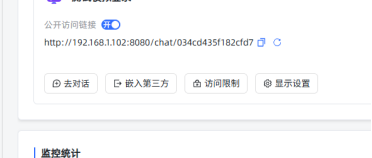
(2)调用接口/chat/api/auth/login/accessToken
http://192.168.1.102:8080请改为实际访问的域名/IP地址。账号密码改为实际填写。
curl 'http://192.168.1.102:8080/chat/api/auth/login/034cd435f182cfd7' \
-H 'Accept: application/json, text/plain, /' \
-H 'Accept-Language: zh-CN' \
-H 'Content-Type: application/json' \
--data-raw '{"password":"MaxKB@123","username":"outer1"}' \
--insecure

正确获取:
{"code": 200, "message": "\u6210\u529f", "data": {"token": "xxxx"}}
密码错误:
{"code": 500, "message": "\u7528\u6237\u540d\u6216\u5bc6\u7801\u4e0d\u6b63\u786e", "data": null}
获取token,此token为对话用户登录标识。
使用实际语言来编写代码,将三方平台应用账号信息经过验证正确无误后,映射到MaxKB v2的对话用户中。后续根据此token来标识MaxKB对话用户。
Python3 获取token参考代码:
#!/usr/bin/env python3

# -*- coding: utf-8 -*-

"""

获取登录 token 的脚本

"""


import requests

import json

import urllib3


# 禁用 SSL 警告(因为使用了 --insecure 选项)

urllib3.disable_warnings(urllib3.exceptions.InsecureRequestWarning)


def get_token():

    """

    发送登录请求并获取 token

    """

    url = 'http://192.168.1.102:8080/chat/api/auth/login/034cd435f182cfd7'


    headers = {

        'Accept': 'application/json, text/plain, */*',

        'Accept-Language': 'zh-CN',

        'Content-Type': 'application/json'

    }


    data = {

        "password": "MaxKB@123",

        "username": "outer1"

    }


    try:

        # 发送 POST 请求,verify=False 对应 curl 的 --insecure 选项

        response = requests.post(

            url,

            headers=headers,

            json=data,

            verify=False  # 忽略 SSL 证书验证

        )


        # 检查响应状态码

        response.raise_for_status()


        # 解析 JSON 响应

        result = response.json()


        # 检查响应代码

        if result.get('code') == 200:

            token = result.get('data', {}).get('token')

            if token:

                print(f"登录成功!Token: {token}")

                return token

            else:

                print("响应中未找到 token")

                return None

        else:

            print(f"登录失败: {result.get('message', '未知错误')}")

            return None


    except requests.exceptions.RequestException as e:

        print(f"请求错误: {e}")

        return None

    except json.JSONDecodeError as e:

        print(f"JSON 解析错误: {e}")

        print(f"响应内容: {response.text}")

        return None


if __name__ == '__main__':

    token = get_token()

    if token:

        # 可以将 token 保存到文件或返回

pass.png)
(3)设置session storage (或local storage,session是会话级别)
Key命名格式:034cd435f182cfd7-accessToken 。其中034cd435f182cfd7替换为应用的accessToken
Value为token值

可使用nginx部署到MaxKB同域域名,设置全局缓存
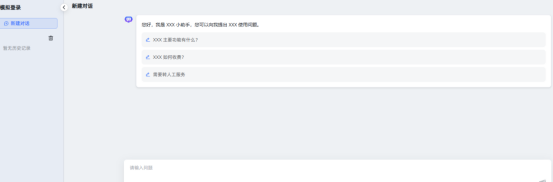
(4)验证登录
地址:http://192.168.1.102:8080/chat/034cd435f182cfd7
无需账号密码,直接登录成功:
(5)验证通过并设置缓存后,编写代码,重定向到应用地址